
Put AI to work on your videos.

EndlessAI is a video intelligence platform: it turns your videos and cameras into working AI applications in minutes, guided by your goals and policies. Get reports, alerts and answers with video evidence in the app, your chat apps, or through an MCP server and API.

Building with Claude Code, Codex, or your own app?Connect through MCPBuild with the API

Warehouse aisle: an unstable pile of cardboard boxes stacked on the floor in front of shelved pallets
Incident reportWH1 · CAM 3high

Unsafe stack on floor in front of racking — unstable, needs attention

  1. 01Boxes accumulate on the floor across the aisle from high-bay racking.
  2. 02The pile exceeds stable stacking height and leans into the walkway.
  3. 03Falling-stock and blocked-egress risk while pickers pass the aisle.
14:14 · evidence attachedView evidence →
  • WhatsApp
  • Telegram
  • Slack
  • Amazon S3
  • Google Drive
  • Dropbox
  • Ring cameras
  • RTSP · HLS
  • OpenAI
  • Anthropic

Traceable and Auditable — the system shows its work.

Observations and conclusions point to specific frames, timestamps and user-defined policies.

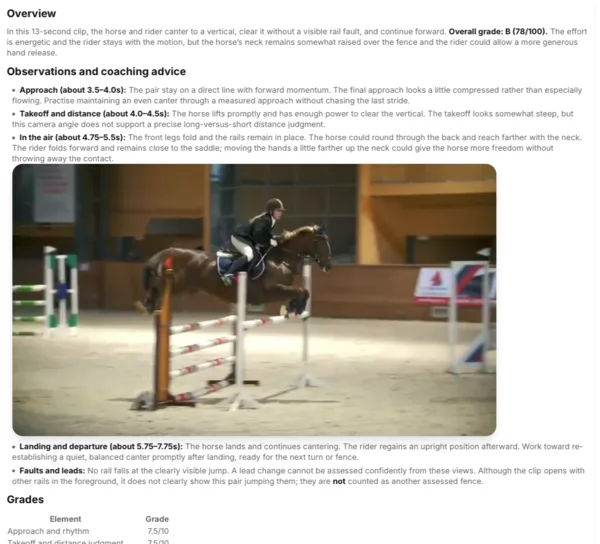
A scanned clip of a show jump with timestamped observations and grades
A scanned clip: timestamped observations, the key frame, and grades.
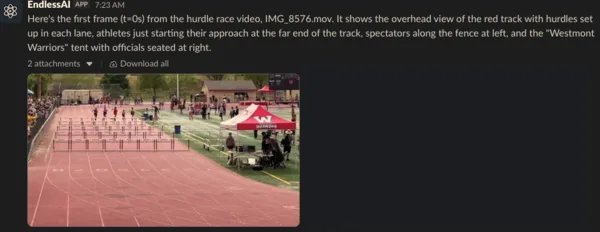
The EndlessAI app in a Slack channel answering with the first frame of a race video
The same project answering in a Slack channel.

Ask from your phone and get alerts where your team already talks.

  • WhatsApp
  • Telegram
  • Slack

Three Simple Steps

  1. Create a project

    Tell the Platform what you want it to do for you. The assistant guides setup, asks questions and configures your project in minutes. Add your policies or let it create one. Refine your project in plain language.

  2. Add your video sources

    Upload a file, paste a link, connect cloud storage, or add a live camera. The Platform scans it and builds a searchable timeline of what happened. Test your setup by uploading videos or connecting streams.

  3. Get results and act

    Get reports based on your goals and policies. Configure actions or investigate your footage. Ask follow-up questions, and receive results in your connected chat apps.

    • WhatsApp
    • Telegram
    • Slack

Videos in, actionable intelligence out.

01 Input

Your videos and project context

Video sources

  • Video files (mobile clips or hours of footage)
  • Live and streaming video (RTSP, HLS)

Project setup

  • Documents, rules and policies
  • Goals and policies refined in plain language
02 EndlessAI

See, hear, understand, reason

See
— objects, motion and events
Hear
— speech and sound events
Understand
— what happens as it evolves
Reason
— interpret the video, apply your rules and policies, explain with evidence, and decide the next action

OpenAI, Anthropic, Google and other models.

03 Output

Actionable intelligence

  • Alerts with evidence
  • Answers with proof
  • Reports, formatted or unformatted
  • Actions through webhooks, MCP and APIs

Video search finds a clip. EndlessAI determines cause and effect.

Not a label and a confidence score — an evolving account of what happens as it unfolds. Timelines, causal chains, severity, and what the footage does not show.

  • Timestamped
  • Cause & effect
  • States its limits
  • Evidence frames
Incident report · aisle-4.mp4critical

Cause-and-effect interpretation

  1. 1The forklift turns close to the left-side rack.
  2. 2The rack area adjacent to the forklift begins to deform.
  3. 3That local failure triggers a rapid progressive collapse of loaded rack sections.
  4. 4Stored goods and rack components fall into the aisle.
  5. 5The forklift moves away while the collapse continues — the operator remains exposed to falling stock.

Also flagged: unsafe proximity of a powered industrial truck to pallet racking · operation in a narrow aisle with loaded high-bay storage · severe struck-by hazard from falling materials. Based only on what is visible in the clip.

Loud when it matters, quiet when it doesn't.

Describe a condition in plain English. The Platform turns it into a rule — Before → After → Notify — and watches. Live matches arrive as “possible” and become “confirmed” only once they are verified.

Adult bald eagle with wings partly spread, feeding two chicks in a stick nest
confirmedToday 5:12 AM

Adult eagle feeds chicks and leaves the nest

Nest cam · State ParkView evidence →

Building with Claude Code, Codex, or your own app?

Connect your agent with MCP

Let Claude Code, Codex, or your agent work with video.

Connect your MCP client to your EndlessAI project.

claude mcp add --transport http supervision \
  https://platform.endlessai.com/mcp \
  --header "X-Api-Key: svk_..."
Or call the API

A REST API, OpenAPI 3.1.

Simple project API, or full platform access with roles and permissions. Base URL platform.endlessai.com/api/v1.

curl -X POST $API/projects/$PROJECT/agent/ask \
  -H "X-Api-Key: $KEY" -H "Content-Type: application/json" \
  -d '{"question": "When does the first truck arrive?"}'

Get the Platform working on your footage in minutes.